Lenovo’s hardware is great, but Googlebook OS still needs some polishing.
The launch of a new operating system presents a lot of challenges, but also the opportunity to install significant upgrades to the status quo. With its new family of notebooks, Google is trying to combine the best features of Android and Chrome OS on a line of PCs that are smarter, easier to use and more mobile-friendly than anything that's come before. However, while Lenovo has done an excellent job of providing premium hardware for the Googlebook 15, Google's latest laptop platform suffers from a number of growing pains you often get from first-gen software.
For die-hard Android fans, some of these issues might be worth overlooking for the increased synergy you'll get between your phone and laptop. But for other users, it's probably worth waiting for a more mature version of Googlebook OS before making the switch.
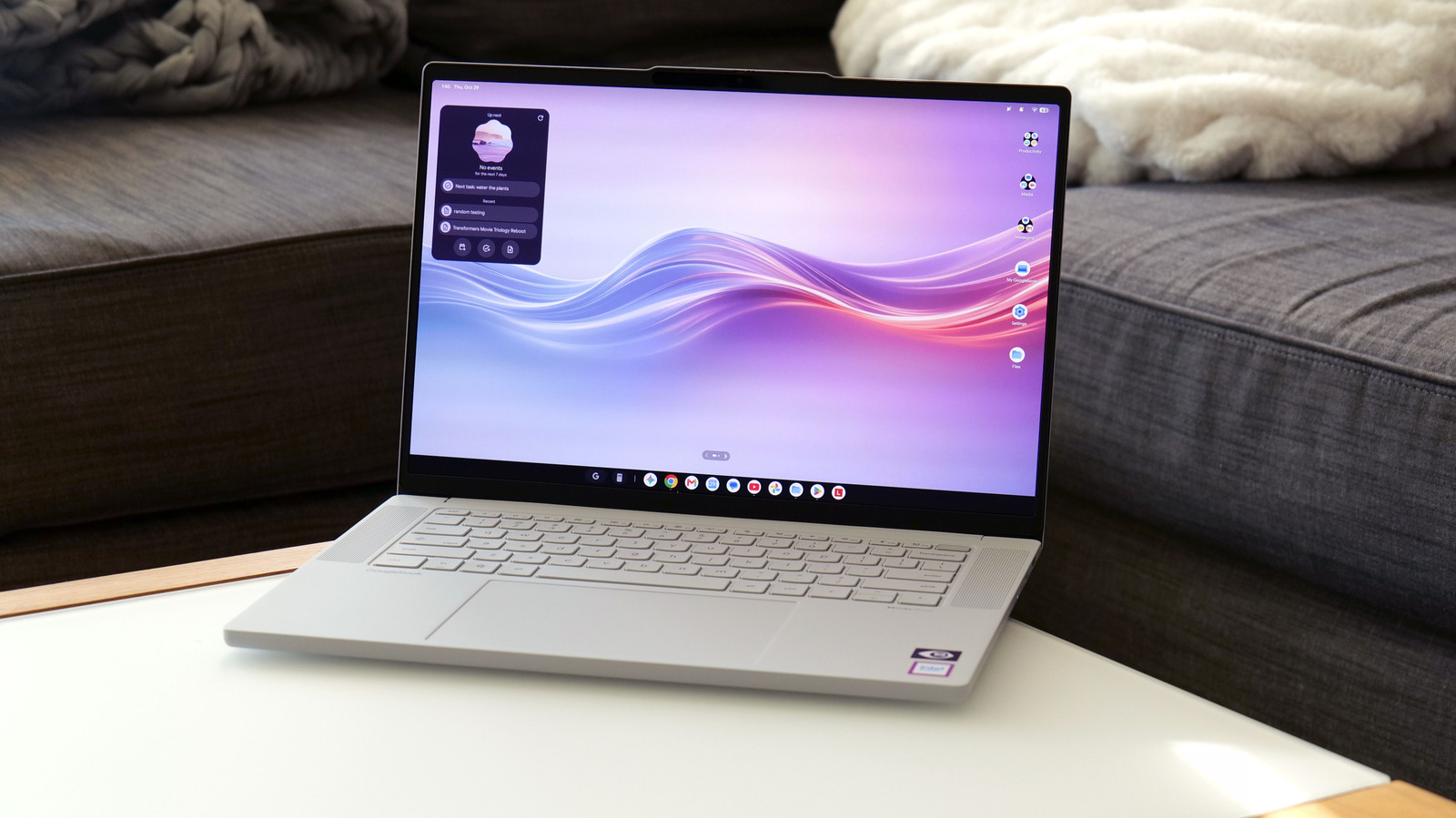
The design and hardware on this Googlebook is so good I'm actually a little bit annoyed that Lenovo hasn't made a Windows equivalent. It features a 15.3-inch OLED display with 120Hz refresh rate, a typical brightness of 500 nits and HDR True Black 1000 certification. It's bright, it's colorful and delivers pretty much everything you could ask for on a laptop in this price range.
That said, I'd argue the rest of the Googlebook 15's design is even better. Lenovo's chassis is made from a mix of plastic and carbon fiber, with bits of magnesium-aluminum alloy used in certain areas, like its lid, for increased strength and lightness. Then Lenovo covered the entire system in a "silk-touch" finish that makes the whole laptop feel like a piece of unglazed porcelain. It's surprisingly luxurious and comes with the added benefit of reducing the appearance of fingerprints. And despite having a larger screen, the Lenovo Googlebook 15 actually weighs less than a 14-inch MacBook Pro (2.85 pounds vs. 3 pounds).
Elsewhere, Lenovo's Googlebook has punchy up-firing quad speakers with Dolby Atmos flanking the keyboard, a decent selection of ports (2x USB-C, 1 USB-A, HDMI and 3.5mm audio) and a massive haptic touchpad. The keyboard has just enough bounce to make typing quite pleasant, while tweaks like the Google key make performing OS-related shortcuts just a bit easier. There's even a built-in camera with a physical shutter (plus a separate fingerprint sensor) that supports facial recognition, so signing in is friction-free.
The final distinguishing characteristic of all Googlebooks is the lightbar on their lids, which changes color depending on a handful of factors. In normal use, the LEDs are white, but when charging, the light reflects how much charge the laptop has (red means under 20 percent, yellow means 20 to 59 percent, etc.). Alternatively, during startup or when talking to Gemini, you'll get special animations across an assortment of colors. The one issue is that when compared to the Pixel 11 Pro's HiLight indicator, you generally don't interact with a Googlebook when its lid is closed. This makes the Gemini LEDs more useful to someone sitting opposite the laptop than whoever is actually using it.
One of the nice things about the Googlebook platform is that Google stipulates that all participating systems come with at least 16GB of RAM, so you won't have to worry about running out of memory while doing basic productivity tasks like you do on some budget machines. And when combined with an Intel Core Ultra 5 325 chip and 256GB of base storage, the result is a totally proficient system for handling all of your core computing needs.
The bigger issue for the Googlebook 15 is that because you're encouraged to install the same kind of mobile apps you'd use on a phone, you'll often have more performance than you can really use. It's either that or you'll be faced with apps that haven't been properly optimized to take advantage of the hardware. A good example of this is Photoshop, because the version you download from Google's Play Store is the mobile edition instead of the full desktop app you'd normally install on Windows or Mac PCs. Furthermore a lot of today's Android apps are designed to be run on ARM-based chips instead of silicon with x86 architecture, like the one in Lenovo's machine, which can result in more bugs or stuttery performance. However, at least on tests like Geekbench 7, the Googlebook 15's multi-core CPU score of 9,011 is just as good if not better than what you'd get on a similarly priced PC — like a midrange Dell XPS 13 (7,124 with an Intel Core 5 320 chip).
The nice thing about being a mix between an Android phone and Chromebook is that Googlebook OS feels immediately familiar and is very easy to use. You get notifications and quick settings in the top right, a row of icons in a taskbar along the bottom and drawer for all your apps. From there, it's super simple to do stuff like side-by-side multitasking — all you need to do is open an app and drag it to the left or the right and let the OS automatically snap the window in place. For general productivity, web browsing or checking social feeds, there's plenty of stuff to like about Googlebook OS' streamlined approach to basic computing.
Where things get even more interesting is with some of Google's special features, the most important of which is cross-device sharing. I'm kind of glad I waited a little bit to do this review because right at launch, a lot of Google's "Better Together" features weren't available with Samsung phones. That changed shortly after release and this collection of tools is the closest thing Googlebooks have to a secret weapon.
Pairing your Googlebook to your Android handset works a lot like the Windows Phone Link app, except that it's better in almost every way. Setup is as easy as scanning a QR using your phone. From there, you can do stuff like transfer things between devices simply by dragging and dropping (via the Files app), seamlessly cast apps from your phone to the Googlebook, sync notifications between devices or pick up where you were last browsing on your phone. In a lot of ways, Google has created the kind of cohesive ecosystem that Mac and iPhone users often say is one of the best things about Apple's family of products, but centered around Android instead of iOS.
That said, there are a number of quirks and limitations that still need work. Transferring files, for example, is currently limited to things under 200MB. For anything bigger, you'll need to rely on the Quick Share tool. And while it works, casting things from your phone to the Googlebook is a bit stuttery and less responsive than I'd like. It's fine for checking messages or apps with a relatively static UI, but if you try to cast a game, there's a noticeable drop in framerate and smoothness.
Some of Googlebook OS' other more unique tools include the Magic Pointer, which makes it easy to select objects so you can ask Gemini about them or transform highlighted pictures into AI-generated drawings. Now, I'll be honest, creating cute stickers or using Gemini to whip up things like party invites isn't something I do regularly, so I sort of had to go out of my way to test these features. But your mileage may vary. Meanwhile, Rambler might be the best voice transcription tool out now, so it's nice to see Google port that over from the Pixel 11 family. And it's so good, there's a dedicated button for it on the laptop's keyboard. You can also use Gemini (and Gemini Notebook) to find, organize and summarize all sorts of different files and docs, but that's sort of par for the course these days.
You can even use AI to create your own custom widgets, but like a lot of machine learning-based tools, the results are hit or miss. At first, I asked the Googlebook to make a basic dashboard showing the live score for all the NBA games, but that didn't work. So then I paired the list down to just a handful of teams and it was able to display the correct scores for various matchups, but the UI remained rather barebones and a bit confusing to look at.
Unfortunately, it feels Googlebook OS still needs a bit of polishing and extra developer support to make it really shine. In addition to often being limited to the mobile version for many apps, the various tiers of app compatibility can get pretty confusing. If you try to install an app from the Play Store, you'll notice that there are five different levels of optimization ranging from "Made for desktop" to "Compatible for desktop" or simply "Better on the website." And if a certain app hasn't been tested, it may be labeled as "Built for mobile."
I do appreciate that all of these tags show up front and center on the listing for each app, but it still results in a lot more trial and error that most people probably want to deal with. Some apps work great, some apps suffer from display glitches and some apps are saddled with smaller issues like awkwardly placed UI elements or not being able to maximise a window to fullscreen. So even though you have a big, beautiful display, you'll still have bits of your desktop wallpaper peeking out from both sides of an app.
In a vacuum, the 70Whr battery inside the Googlebook 15 is decently sized. However, because this system has the largest display out of any of the first batch of machines powered by Google's new OS, overall longevity is just okay.
Since there still aren't a ton of desktop-level benchmarks available for Googlebooks at the moment, I decided to perform our usual smartphone battery test on it instead. This involves local video playback to drain the battery from 100 percent to zero, where Lenovo's machine lasted eight and a half hours. That might seem okay until you compare it to something like an XPS 13, which hit 15:56 while running PCMark 10's more demanding Modern Office rundown test. Thankfully, the Googlebook 15 fared a bit better during everyday use, where it survived a full eight-hour workday (including a number of tests and benchmarks) and still had 20 percent left in the tank.
The Googlebook 15 is a tale of two technologies. On one hand, the hardware Lenovo built is great. It features a vivid 15-inch display with a 120Hz refresh rate, an Intel Core 5 CPU with plenty of performance, surprisingly good speakers, plenty of ports and a huge haptic touchpad. Meanwhile, its design is the icing on the cake, offering a streamlined chassis with a super smooth eggshell finish that begs to be touched. And while its battery life could be a touch better, the rest of the machine is so nice, its merely average longevity is easy to gloss over.
However, the same can't be said for Googlebook OS. The sheer number of different app compatibility levels can be hard to keep track of and, at least right now, a lot of software simply doesn't run as smoothly as I'd really like. So even though the Googlebook 15 is more than capable of serving as a general productivity machine, being limited mostly to mobile versions of apps means the laptop doesn't feel as powerful or versatile as a similarly-priced Windows or Mac alternative. For people wary of first-gen gadgets, that mantra seems to hold doubly true for first-gen OSes.
If you're a hardcore Android user though, there's a lot to like about how well Googlebooks and Google-based phones work together. Handing off tasks and files from your phone to the laptop is a breeze, and the continuity you get between apps and notifications makes bouncing between two devices surprisingly seamless. And while I personally don't get a ton of value out of every Gemini feature, they can come in handy in a pinch. I adore Lenovo's chassis and I think Googlebook OS has a lot of potential, but right now I feel like it's best to revisit this platform once more of its initial kinks have been ironed out.
Source: Engadget